Posts

Showing posts with the label Chrome

Filling the G-Apps: Desktop Chrome App Launcher Not working
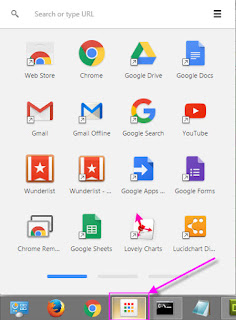
Image
This was one of my many draft posts waiting to see daylight (this one's about two years old) and unfortunately it looks like the Desktop Extension might be depreciated at some point. The version I'm talking about is the original App Launcher from Google that resides on your desktop Taskbar not in the Chrome browser: Back to the issue: If at some point you get an error that stops your Chrome App Launcher from launching and instead launches a standard window you should just need to correct the link so that the App Launcher works again. This can be done by completing the following steps: Locate the shortcut that's not working, whether it's on your desktop, Quick Launch Toolbar or Start Menu. Right click the shortcut and go to "Properties" In the "Target" box go to the very end of the path and type " --show-app-list" i.e. it should look something like this:  "C:\Users\username\AppData\Local\Google\Chrome\Application\chrome.e...

Filling the G-Apps: Chrme Apps v Extensions

Image
What Are Chrome Apps/Extensions? Chrome Extensions are small pieces of software that integrate with Chrome browser giving it more functionality, while Chrome Apps are complete applications that use the Chrome browser as a GUI and connect to the external website for the coded processes and functions. For specific details please see: Extensions and Apps in the Chrome Web Store If you have a few extensions you used regularly we recommend that you download and install the Chrome App Launcher for your desktop as it allows for easy access and takes up less real estate: Chrome Apps Launcher Chrome Apps Below is a list of Chrome Apps that I've found useful on our network: LocalLinks - Used to open a local network folder view through neXus (will be depreciated) goo.gl URL Shortener - Create short links for long web addresses ezAutoCorrect for GMail - Auto correct for spelling, capitalization etc. Google Drive - Chrome Access to your clipboard Chrome Exten...

Filling the G-Apps: Chrome Management

I've just realised that I've been way too busy and haven't posted anything in a long time. I have about 10 draft posts that have been sitting there waiting to be finished, one since I started this blog, so here's a quick one: Chrome Management has become a lot more functional recently. Originally this functionality was only available to Chrome devices like the Chromebook but it seems they've opened it up to any device with the Chrome browser installed. For better control over which Apps and Extensions can be installed in your Google Apps network you can "Force Install", restrict, recommend and block which Apps and Extensions you want you users to have access to based on the OU they're under. You can manage Chrome extensions through your Google Admin Console OU settings under: Device Management > Chrome > User Settings > Apps and Extensions You might also find the "User Experience" and "Content" sections useful.

Basic Web Browser Tips

Web browsers have all been redesigned in the last couple of years to allow you to view multiple websites within one browser window. Below is a small list of the most commonly used shortcuts that you might not already know about: ● Ctrl+Tab: Switch between your open tabs ● Ctrl+Shift+Tab: Reverse switch between your open tabs ● Ctrl+Click: Opens a link in a new tab ● Shift+Click: Opens a link in a new window ● Ctrl+T - Opens a new browsing tab ● Ctrl+Shift+T - Closed a browser tab by accident? No problems, this will bring it back

Filling the G-Apps: Chrome/Gmail Crash

A more common issue with Chrome & Google Apps these days is an DNS caching issue. If you're using the simple but useful "Stay Signed in" checkbox and there's an issue with your connection or your IP address is changed you could come across the Chrome/Google Apps equivalent of the "Blue Screen of Death", nowhere as bad and simple to fix. You'll be faced with a white screen with the appropriate Google Apps icon & the text "The app is currently unreachable". To resolve the issue you just need to clear your DNS by completing the following steps: Open your command line I.e. Dos prompt (On Windows PC , press Windows +  R > type "cmd" > click Ok)  On Command Promt type "ipconfig /release" Then type  "ipconfig /flushdns" Then type "ipconfig /renew" Similar details for the Tasks Chrome Extension can be found here . Another solution that works when it's just a locked sessio...